
Click-VR Visualizer1.06 - Download
You'll be able to download in few seconds.
Publisher Description
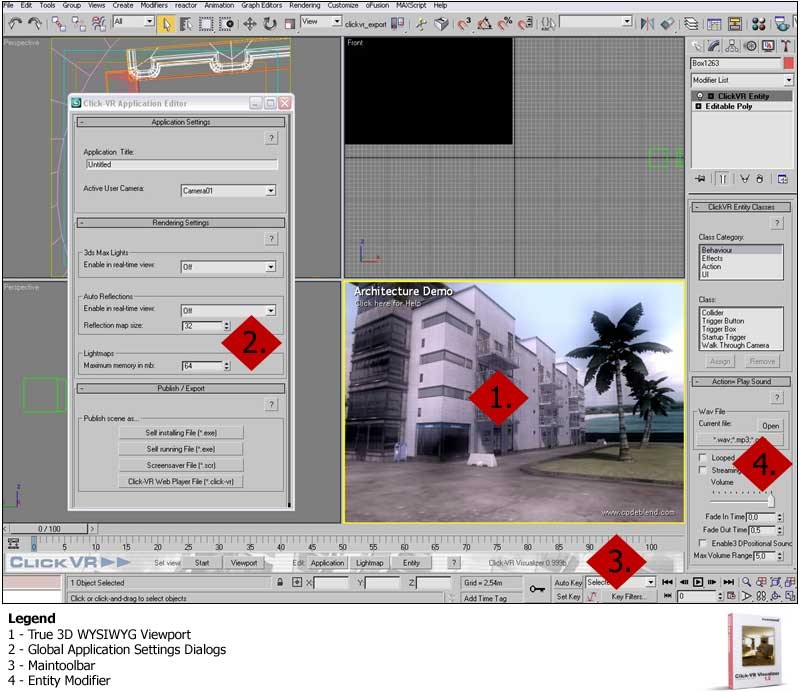
The premier real time rendering plugin for Autodesk 3ds Max! Instantly explore your scenes in real time and create interactive amazing 3D presentations and visualizations! Bring your projects to life with animations, sounds, videos and advanced user interactions!
Be productive instantly!
Click-VR Visualizer is completely integrated in Autodesk 3ds Max. You do not need to waste time exporting data or learning new 3D software. Everything has been designed to let you be productive and get professional results in minutes. Do you know Autodesk 3ds Max? Then you know how to use Click-VR Visualizer.
Save Time using true 3D WYSIWYG Software!
Click-VR Visualizer is true 3D WYSIWYG software. Inside Autodesk 3ds Max you instantly see the final result of your work in an extended interactive viewport. All changes are updated immidiately while you edit the scene. Further, you can test your interactive scenes inside this Viewport at any time - no more waisted trial-and-error times.
Impress Your Audience with Oustanding Quality!
Click-VR has been originally designed and used for next-generation blockbuster games. The rendering engine is capable of rendering near photorealistic with true interactive frame rates. This includes real-time soft shadows and reflections. Outperforming existing real-time solutions in terms of rendering performance and quality - Click-VR Visualizer is the most comprehensive rendering system available for Autodesk 3ds Max users.
Easily Publish and Distribute your Work!
You can make 3D Scenes available for everyone on the internet or cd-rom. Distributon of exported files is free of charge, allowing everyone to explore and interact with your 3D scenes, in realtime, whether as executable files or integrated in html pages for viewing with a web browser.
About Click-VR Visualizer
This program is available in English. It was last updated on 29 September, 2026. Click-VR Visualizer is compatible with the following operating systems: Windows.
The company that develops Click-VR Visualizer is Codeblend. The latest version released by its developer is 1.06.
The download we have available for Click-VR Visualizer has a file size of 10.5 MB. Just click the green Download button above to start the downloading process. The program is listed on our website since 2007-01-01 and was downloaded 0 times. We have already checked if the download link is safe, however for your own protection we recommend that you scan the downloaded software with your antivirus. Your antivirus may detect the Click-VR Visualizer as malware if the download link is broken.
How to install Click-VR Visualizer on your Windows device:
- Click on the Download button on our website. This will start the download from the website of the developer.
- Once the Click-VR Visualizer is downloaded click on it to start the setup process (assuming you are on a desktop computer).
- When the installation is finished you should be able to see and run the program.
Program Details
System requirements
Download information
Pricing
Version History
version 1.06
posted on 2007-01-01
Disclaimer
External Download
We do not host Click-VR Visualizer on our servers. We did not scan it for viruses, adware, spyware or other type of malware. This app is hosted by the software publisher and passed their terms and conditions to be listed there. We recommend caution when installing it.
The external download link for Click-VR Visualizer is provided to you by apps112.com without any warranties, representations or guarantees of any kind, so access it at your own risk.
If you have questions regarding this particular app contact the publisher directly. For questions about the functionalities of apps112.com contact us.
